
Reviews
FrameShare Review – Add Social Sharing to Your Framer Site
Last updated:
Written by:
FrameShare is a Framer plugin designed to help you quickly add social sharing buttons to your website, without touching any code.
Built for content-driven sites like blogs, directories and SaaS websites, it makes it easy for visitors to share your pages and drive more traffic organically.
We currently using FrameShare on the Frameplate website, and it’s one of those plugins who made our job much easier.
TL;DR
Type: Framer Plugin
Best for: Bloggers, directories, SaaS websites (blogs and docs), content creators
Price: $19 (one-time payment)
Website: frameshare.social
Getting Started &First Impressions
FrameShare keeps things simple and that’s exactly the point.
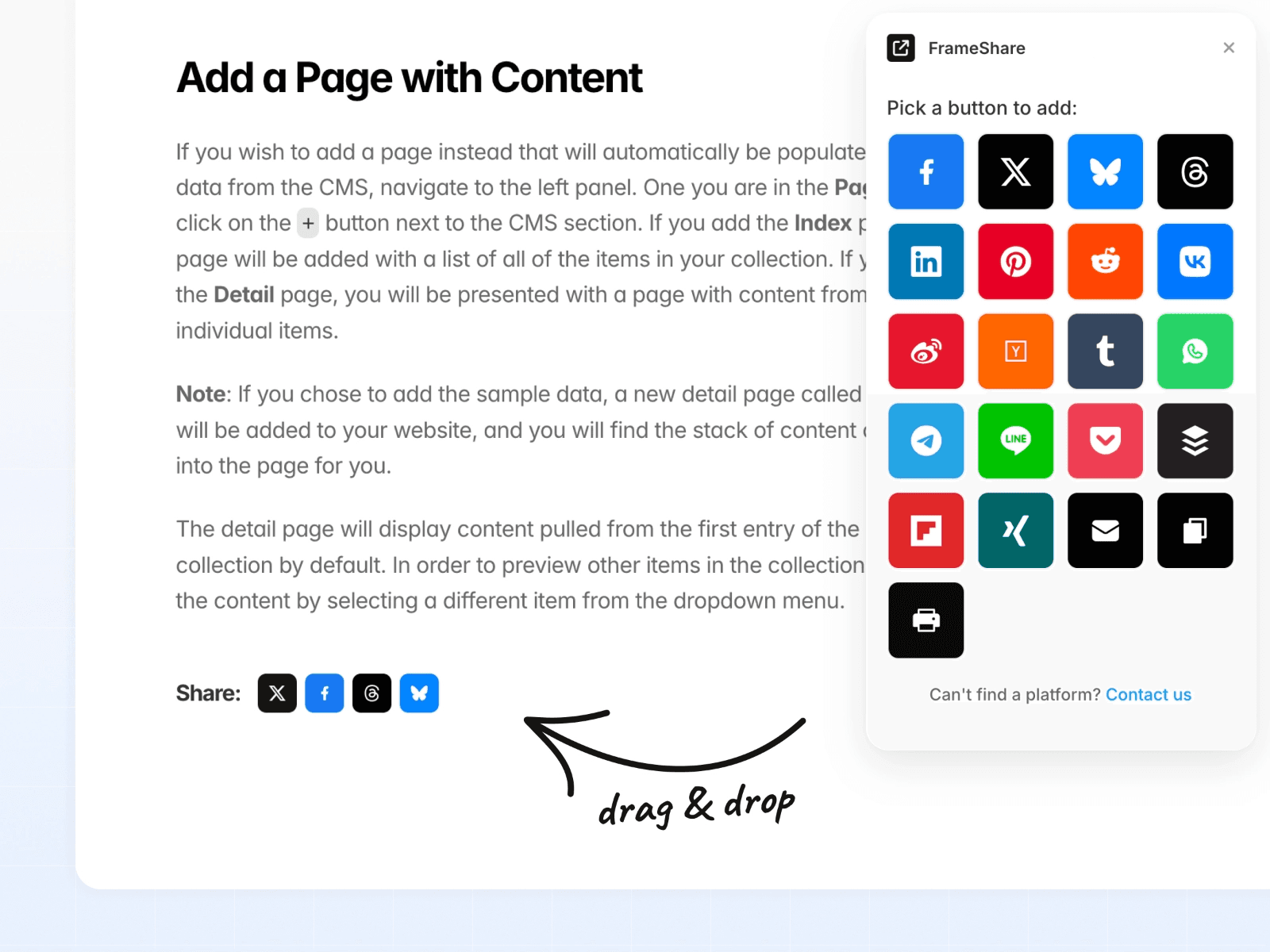
Once you've purchased the plugin and activated your license key you'll land on a minimal interface, with instant access to a wide range of social share buttons.
There’s no unnecessary setup or configuration (other than activating the license key). You open the plugin in your project, drag the buttons you want to use and it just works.
It feels like one of those tools that doesn’t try to do too much. It focuses on one job and does it well: making content shareable with as little friction as possible.
What You Get
FrameShare gives you everything you need to add social sharing to your Framer project in seconds:
20+ social media share buttons
Drag-and-drop buttons directly inside Framer
No-code setup
Instant functionality after publishing
Customisable styles (colours, sizes, layout)
Works across any page or CMS-driven content
This is especially useful if you’re building a content-heavy site and want to encourage distribution without relying on external tools or custom code.
We're actually using it on Frameplate and you can test it with the share buttons displayed at the bottom of this article.
Key Highlights
Fast Setup
One of the biggest advantages of FrameShare is how quickly you can get started.
You simply drag a share button onto your canvas, position it where you want, customise it and publish your site. There’s no need to configure APIs, install scripts, or connect third-party services.
For Framer users who want to move fast, this is a huge win.
Fully Customisable to Match Your Brand
Unlike many free solutions that come with rigid styles, FrameShare gives you full control over how the buttons look.
You can adjust:
Colours
Sizes
Spacing
Layout
This makes it easy to integrate seamlessly into your design, whether you’re building a minimal blog or a more polished SaaS website.
Built to Drive More Traffic
Social sharing is one of the simplest ways to increase reach on your website but only if it’s easy for users.
FrameShare removes friction by placing share actions directly where users need them. Whether it’s a blog post, a directory listing or a landing page, visitors can share your content in one click.
Over time, this can compound into meaningful traffic: especially for SEO-driven or content-focused sites.
More Options Than Most Free Alternatives
Most free social sharing tools limit the number of platforms you can use or the design of the share buttons.
FrameShare includes 20+ social platforms, giving you much more flexibility depending on your audience. This is particularly useful if your traffic isn’t just coming from mainstream platforms like Twitter or Facebook.
Who It’s For
FrameShare works best for websites where content distribution matters:
Bloggers publishing articles or tutorials
Directory websites listing tools, resources, or products
Indie makers building content-driven sites
SaaS websites with blogs or marketing pages
Newsletter creators with archive pages
Agencies building content sites for clients
If your goal is to get your content shared and seen, this plugin will naturally fit into your workflow.
What Makes It Different
What stands out with the FrameShare plugin is its focus on simplicity and speed.
Instead of being a bloated tool with complex integrations, it’s built specifically for Framer users who want a native no-code solution.
The combination of:
Drag-and-drop usability
Wide range of platforms
Full design control
One-time payment
makes it a practical alternative to external scripts or limited free tools.
You can feel that the plugin was built with Framer users in mind and optimised to fit their workflow as best as possible.
Things to Keep in Mind
There are a couple of limitations worth noting:
There’s no Instagram share button: at first we thought it was a mistake but the maker told us this is due to Instagram restrictions rather than the plugin itself
It’s best suited for content-driven websites rather than purely static landing pages
You’ll still want to think about placement (e.g. inline vs floating) to maximise engagement
None of these are deal-breakers but they’re worth considering depending on your use case.
See It in Action
You can get a better sense of how FrameShare works directly inside Framer with this walkthrough:
Final Thoughts
If you’re building a content-driven website in Framer and want an easy way to encourage sharing, FrameShare is a solid addition to your stack.
It’s simple, flexible, and does exactly what it promises, without adding unnecessary complexity.
For a one-time payment of $19, it’s one of those small upgrades that can quietly improve how your content spreads over time.
Check out FrameShare
Built by 88 Pixels, who has also created the MetaViewer Framer plugin and several Framer templates.